Testing
Manual testing
Some types of tests:
- smoke test: to verify the build is stable. Quick, basic test. Takes several minutes, just to see whether the app's basic functionality is there and the app doesn't crash.
- regression test: to verify no new bugs were added in the last build. Sometimes after adding a new feature or fixing a bug, another feature or an unrelated part of the app might get broken. This test is more thorough and should cover all or most use cases.
- functional test: to verify a new feature. Makes sure the new feature or any new changes work as they should, regardless of whether other parts of the app have any issues.
- UX & localisation tests: to make sure that all strings fit in their allocated spaces, design elements are constricted to where they should be and don't overflow, app is easy to use from a visual point of view, and to check that translations are displayed correctly and do not hinder smooth user experience.
Smoke tests
Super quick tests. Use them if there were:
- minor changes in the code
- minor design changes or any other minor changes (new copy in strings etc.)
Scenario 1: go through onboarding, log in, create group, add second member, add an expense, settle debt. Open Premium screen and check the prices, check that the purchase dialogs appear after clicking on each purchase option.
Scenario 2: + change group colour, edit group name, edit member name. Share link button opens share dialog. Add expense from bill, Android: change app language.
Scenario 3: + delete user account, sign back in with the same account as a new user.
Obviously, check anything that is related to the specific changes as well. This will be described in the changelog (Android) or in Slack (iOS). Always check that ads are displayed and make at least one purchase.
Regression tests
Use them if there were:
- major changes in the code (whole new features and flows, buttons, menus changed, refactoring of old code, etc.)
- major changes in design or UX (new screens, buttons, behaviour, swiping etc.)
Not everything needs to be meticulously checked at all times, but please use your brain. Ads and purchases must be verified every time!
Transactions
For each type of transaction (expense, expense from bill, income, transfer), check that these changes work as expected:
- add new from FAB, from circles. Make sure that the name from circle is who paid.
- multiple people paid
- change the currency
- edit who paid, edit for whom, select all/none. Notice whether the amounts make sense based on member weights – use a group with members with various weights set up.
- split by amounts, split by shares, split by percentages
- select a category, add a new category
- add a receipt photo from camera and from library, delete or select another photo
- filter by purpose, date, category, member; check whether amounts in paid/spent/show all tabs make sense
- date and time; future tx, recurring tx: change start date, change period
- exchange rate
- longclick on expense: edit/duplicate/delete
Debts
- mark as settled
- generate QR code, pay via bank app (whether it opens the bank app dialogue)
- remind debtor
Members
- different weights
- unselected for future txs
- this is me – affects who is selected as default payer when adding transactions via FAB
- photo upload, change, delete
- QR code with bank account
- balances seem correct
- filter "Transactions with this member" works
Group
- change name, colour, currency
- debt minimization
- archive/close/leave
- start a similar group
- exchange rates: reset to fixed/automatic
User & Purchases
- create account, delete account
- profile picture: take photo, choose from gallery, delete
- join group via link sent in Fb messenger, via QR code
- join group as existing member, new member, without creating a member
- change login email
- transfer group ownership
- Premium screen from left menu: buttons work, GP slider works and calculates prices per member correctly, selecting group in GP works; purchase dialogues appear after clicking on each purchase option
- purchasing products works on
- Premium screen from left menu
- bottom sheets (both collapsed and expanded)
- Before ad
- Group settings screen
Connectivity
What happens when the device is offline. Transactions can be added and they are synced when devices goes online (check alongside web app, both directions). Premium screen has placeholders showing no prices, products cannot be purchased.
Android Emulator
To test older Android versions or control various mobile device settings (mainly network speed and latency, or storage, memory or graphics), it is possible via Android Emulator. It is a virtual mobile device running on your computer. Android Studio app has to be installed on the computer. Download it here.
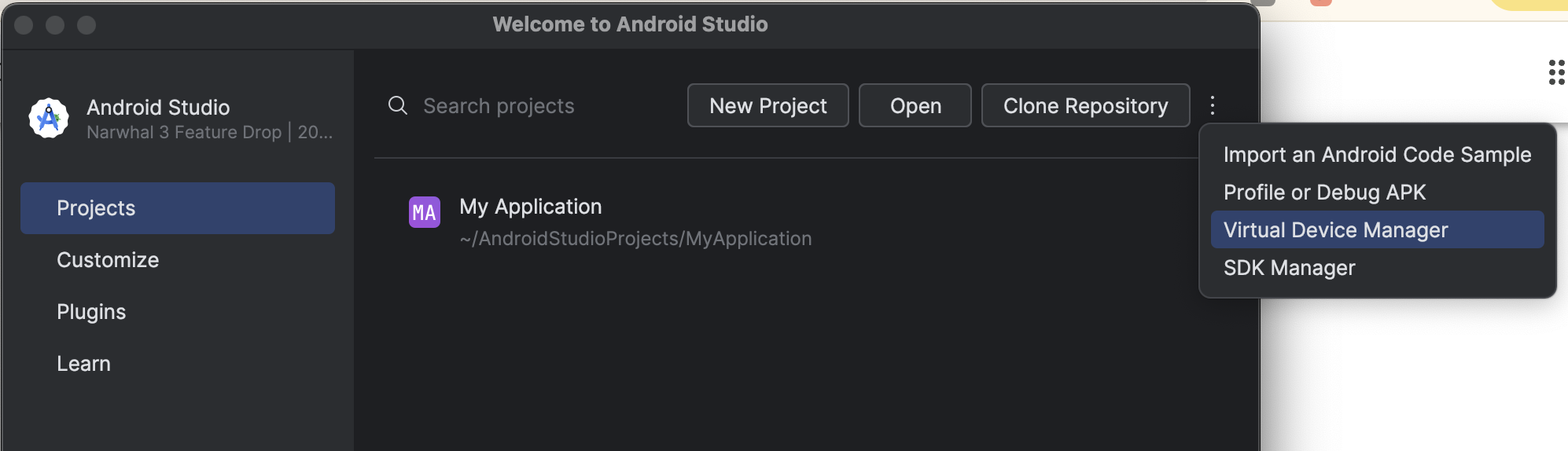
Then, find Virtual Device Manager menu where you can set up and run the emulator. No need to create any fake application in the Studio itself.
Click on the plus icon to add a new device, then select from the list of available devices. Normally, it's best to use the "Medium phone". Select it, click Next and select target API level. The dropdown will show version of Android system, so no need to remember API levels by heart. Under Services, select Show all. However, always select a system image with Google Play Store services enabled. The recommended System Image will be marked by a yellow star icon. Select it and click on Finish. Then, follow the dialog.
After a successful download, your virtual device will be shown in the list of device. Click on the triangle icon on the right side to start the emulator. A virtual mobile display will pop up and you can start testing.
Testing account added to internal test: sutestbara@gmail.com / pw: subarabara. Use this to install internal beta versions from Play Store on the emulator.
Reporting test results and bugs
Bugs are reported into Trello boards according to the platform (Android, iOS, web, backend, Android M3 design), usually into a "bugs" or "todo" columns. When the developer had fixed the bug, they will move the card into a "waiting for qa" column. Android progress is also documented in the Changelog document when it is ready for release testing. Tested fixes are then marked green by the tester. iOS progress is usually documented in Slack ios channel.
Make sure to describe the bug precisely, indicating what app version and build you used. Describe what was wrong as opposed to what the app should do. If unsure, use the appropriate Slack channel to ask questions.
Automated testing
AI tests
Firebase opened AI-powered automatic tests in its App Distribution menu as a Preview feature.
Test scenarios are written in natural language in Firebase console or in a yaml file and imported. The test includes goals, hints and assertion of success. The AI then tries to understand the goals and hints and actually click in the app to reach the goals. Testing can be done on physical or virtual devices provided by Google. The app is readily installed on the device and tested as a fresh install. Tests can be chained together via a prerequisite test id. Only the end test should be run at once, because it will also run all its prerequisite tests. As of March 2026, there is a timeout of 5 minutes since it's still a Preview feature, so only simple tests can be run successfully.
The yaml file might look like this. Notice the prerequisite test case id.
tests:
  - displayName: 01 Onboarding and login
    id: onboarding-and-login
    steps:
      - goal: Go through onboarding
        hint: Click Next to see all onboarding pages and go to login.
        finalScreenAssertion: Sign in page displays.
      - goal: Sign in
        hint: >-
          Use email/password auth provider. Enter email 'testcase@stepuplabs.io'
          and enter password 'testcase'.
        finalScreenAssertion: You are logged in and see the main screen.
  - displayName: 02 Create group, add member
    id: new-group
    prerequisiteTestCaseId: onboarding-and-login
    steps:
      - goal: Create group
        hint: Click Create a new group, name it 'Friends', click Create group.
        finalScreenAssertion: A group is created and its name Friends is visible in a tab.
      - goal: Add group member
        hint: >-
          Click on three dots in the upper right-hand corner, select Members,
          click on New member, name them 'Johnny', save, go back to main group
          screen.
        finalScreenAssertion: >-
          The Recent activity card shows that Test User added a member called
          Johnny.
The tests can be run manually within Firebase console. Note again that if the test cases are chained via prerequisites, only the last test case needs to be run – the run will include all the prerequisite tests as well.
The CI is set up that it runs a specific test after each release. Its config lives in RTDB.
It is allowed to run tests in parallel; use the belowmentioned delimiters.
appDistributionTestCasesdefines the test to be run. Delimiter is coma,.appDistributionTestDevicesselects the device and its specification. Version is the API version, locale can be changed and the app will be tested in that language, orientation can be forced to landscape if needed (for tablets). Model is theidfrom a long list of devices that Google offers. The list can be exported at test environment catalogue. We are using a virtual "medium phone" with idMediumPhone.arm. Delimiter within individual parameters is a semicolon;.
Robo tests
Tried a few times, cannot pass through login, so far it's useless.
How to find Android .apk to download and test
Read about many options in the chapter on builds.
How to get iOS .ipa
Ask Radovan.